Image-Guided 3D Generation
From concept sheets to accurate 3D models.
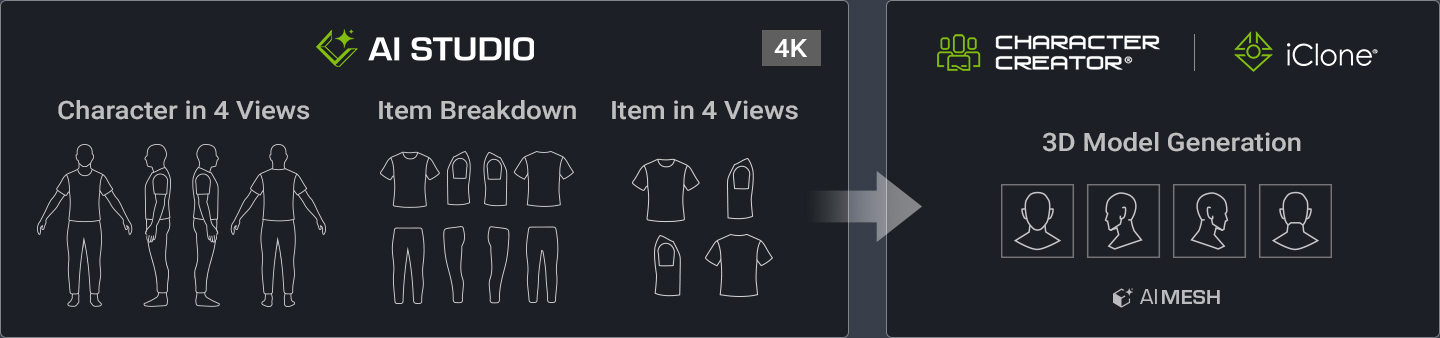
Streamline AI 3D creation with AI Studio's concept design tools. Generate consistent multi-view character sheets, modular clothing and accessories, and high-resolution references for accurate 3D modeling.
AI Studio brings together six specialized concept design tools to help 3D artists prepare the visual references needed for character and outfit generation. From Creative Ideas to Production-Oriented 3D References, all available from AI Studio’s Tool Sections. Manual >
Tool 01 Four-View Character Sheet
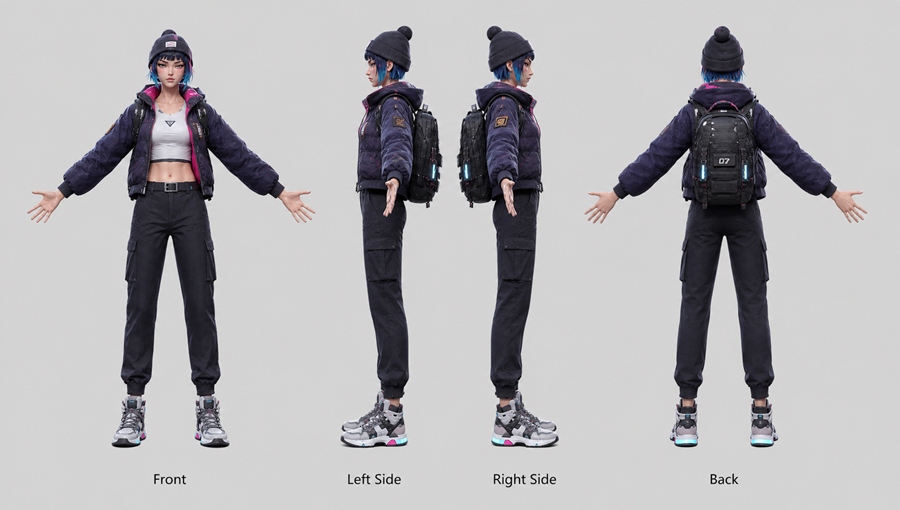
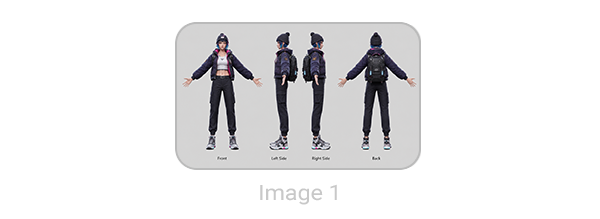
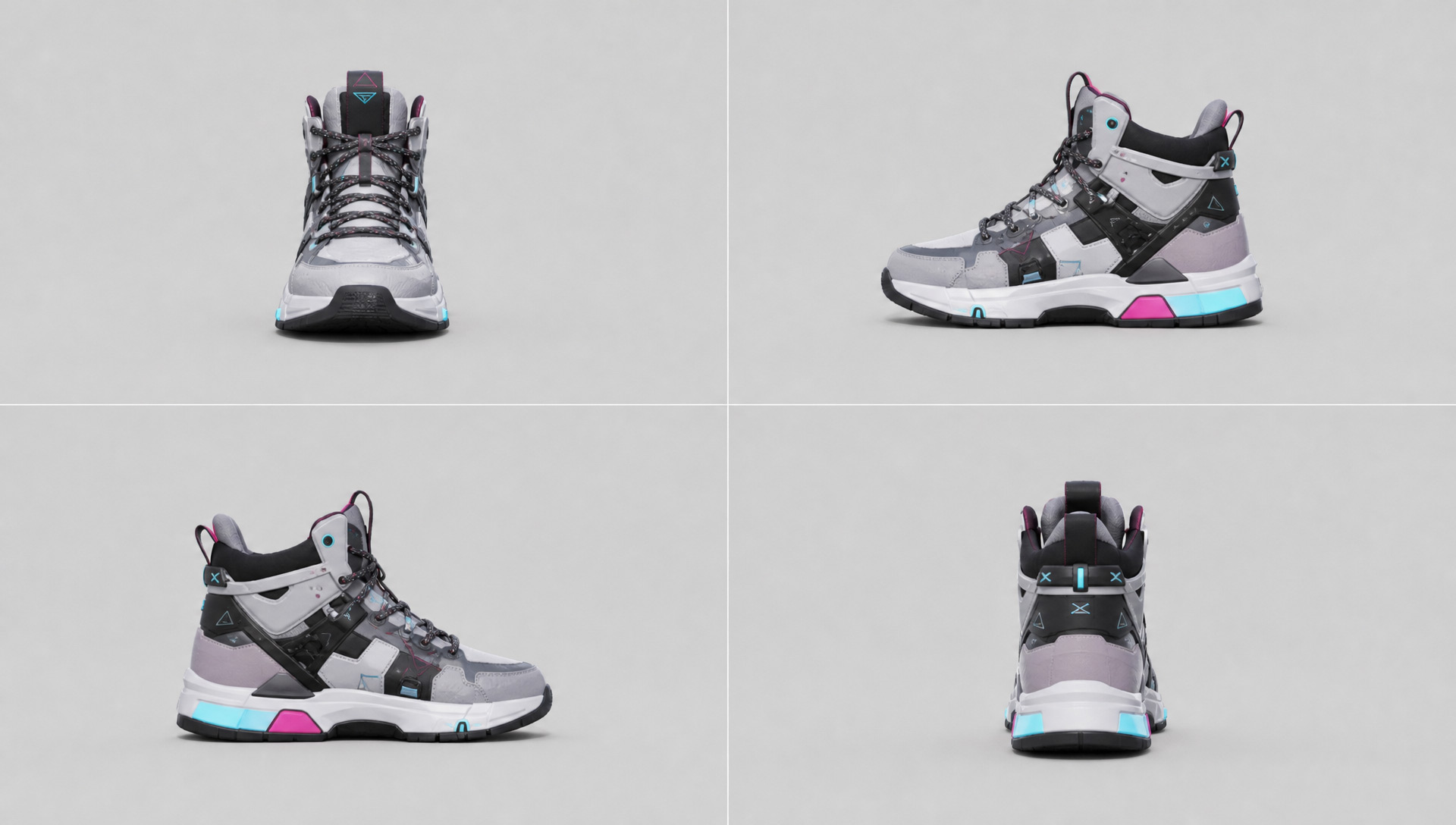
Convert character references into consistent four-view concept sheets (front, back, left, and right). Easily review style, silhouette, and costume details from multiple angles to establish a clear visual blueprint before 3D asset generation.
Tool 01 Four-View Character Sheet
A full-body 3D character turnaround sheet with 4 views (front, left side, right side, back) on a clean light gray background. Aspect ratio 16:9.
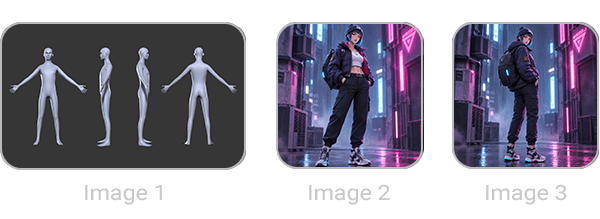
CHARACTER & OUTFIT (from “[Image 2 Image 3]”):
Replicate the character from “[Image 2 Image 3]” with 100% fidelity.
FULL-VIEW ASSET COMPLETION:
Render all back-mounted accessories and outfit layers completely across all 4 angles with no missing parts.
EXACT POSE & LAYOUT (from Image 1):
Match Image 1 's neutral A-pose, open palms facing forward, and 4-view layout. Side views must be strict 90-degree exact side profile views with zero perspective rotation. Label each view directly underneath with only: "Front", "Left Side", "Right Side", "Back".
STYLE:
Photorealistic 3D render, soft studio lighting.
Negative Prompt:
three-quarter view, 3/4 view, angled body, wrong palm orientation, closed fists, dynamic pose, missing parts, bad anatomy, squished character, stretched character, distorted proportions, extra text.
Tool 02 Hair, Clothing & Accessory Sheet
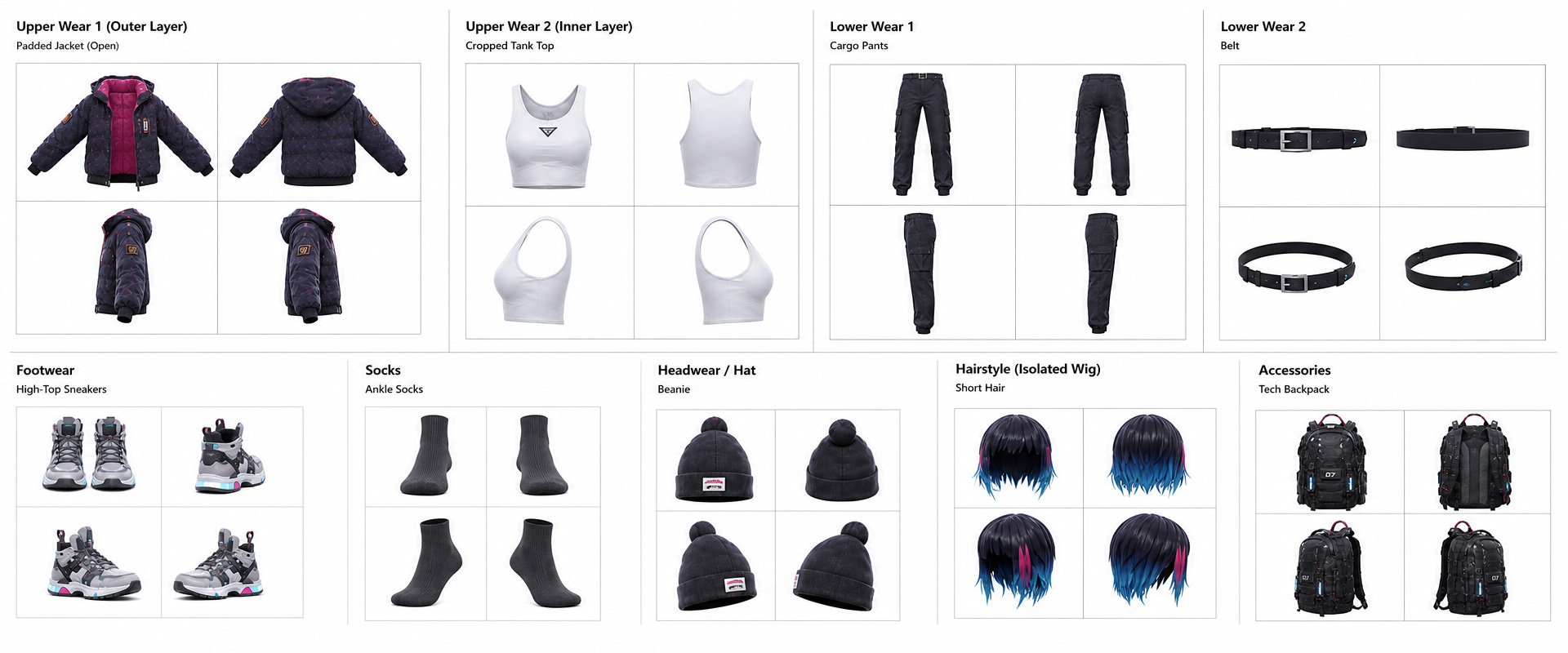
Transform full character concepts into itemized breakdowns of hair, outfits, and accessories. Combined multi-view sheets help you instantly define components for modular 3D asset generation with fully customizable layouts.
Tool 02 Hair, Clothing & Accessory Sheet
A high-resolution 3D clothing and asset breakdown design sheet on a clean white background, cinematic 21:9 ultra-wide aspect ratio composition.
SINGLE STATE PRESERVATION (NO DUPLICATE GARMENTS):
- Preserve Exact Image 1 State Only: Render EACH garment in ONE single state matching Image 1 exactly. STRICTLY DO NOT generate duplicate variations or multiple versions of the same item (such as rendering both open and closed versions of the same jacket). If an outer coat is open in Image 1 , render ONLY the open version once. - Solid Backing on Open Outerwear: When an open garment is rendered, it MUST feature a fully solid, continuous back panel—STRICTLY ZERO hollow back, ZERO see-through gaps, ZERO missing rear mesh, and ZERO holes.
MINIMALIST CATEGORY LABELS AND ITEMIZED NAMES:
- Display clean, minimal category headers and itemized names ONLY for items present in Image 1 : Upper Wear 1 (Outer Layer) Upper Wear 2 (Inner Layer, if visible) Lower Wear 1, Lower Wear 2 Footwear Socks (if visible) Gloves (if visible) Headwear / Hat (if visible) Hairstyle (Isolated Wig) Accessories 1, Accessories 2, Accessories 3 (ONLY if present) - Remove all unnecessary explanatory text, notes, or long descriptions from the sheet.
DYNAMIC 2X2 GRID LAYOUT AND ANTI-DISTORTION:
- Anti-Deformation 2x2 Grid Viewports: To strictly prevent any horizontal stretching, distortion, or warping, all multi-view angles for each asset MUST be arranged into a balanced 2x2 grid block (four-box square layout) instead of a single stretched horizontal line. - Fully Flexible Dynamic Layout: Adaptively organize assets into available categories. Automatically EXCLUDE any non-existent categories or items. Categories and individual sub-assets can stack freely, horizontally or vertically, separated by clean divider lines.
STRICT ZERO HUMAN BODY / ZERO SKIN POLICY:
- 100% Isolated Pure Assets: EVERY asset (including hairstyle, gloves, footwear, socks, headwear, and clothing) MUST be rendered as an empty, isolated standalone 3D product with ZERO human skin, ZERO faces, ZERO limbs, ZERO hands, ZERO feet, and ZERO mannequins or body forms. - Hairstyle as Isolated Wig: Hairstyle must be rendered strictly as a floating 3D wig with an empty inside—absolutely no head or facial features. - Hollow Footwear, Socks, and Gloves: Footwear and socks must be empty inside with no feet or legs. Gloves must be empty 3D shapes with no hands or fingers inside.
STRICT NO-HALLUCINATION & ONLY VISIBLE ASSETS (FROM IMAGE 1):
- ZERO Hallucinated Items: STRICTLY DO NOT generate any imaginary, hidden, or extra items that are not explicitly visible on the character in Image 1 . - No Invisible Undergarments: DO NOT invent unseen inner bras, undergarments, extra socks, or hidden layers if they are not directly visible in Image 1 . Only disassemble clothing layers that actually exist and are visible on the character. - 100% Exact Asset Count: Extract ONLY the precise items worn or carried in Image 1 . Absolutely zero addition of non-existent garments or accessories.
STYLE:
Studio orthographic render, clean isolated clothing assets without human body models, sharp studio lighting, production-ready asset sheet. --ar 21:9.
Negative Prompt:
duplicate garments, duplicate jackets, open and closed versions together, duplicate items, repeated clothes, human body, human skin, face, head, mannequin, body parts, arms, legs, feet inside shoes, hands inside gloves, head inside wig, neck, torso, skin showing, hallucinated items, invented clothes, invisible undergarments, unseen underwear, extra bra, added non-existent garments, imaginary accessories, hollow back, missing back panel, see-through back mesh, holes in fabric, back cutout, unclear garment closure, hidden inner lining, fused layers, unseparated inner layer, horizontally stretched assets, squished proportions, distorted mesh, warped garments, single line angle row, missing back view, duplicate view angles, cropped edges, unnecessary long text, dark background, 1:1 aspect ratio.
Tool 03 High-Res 4-View Item Sheet
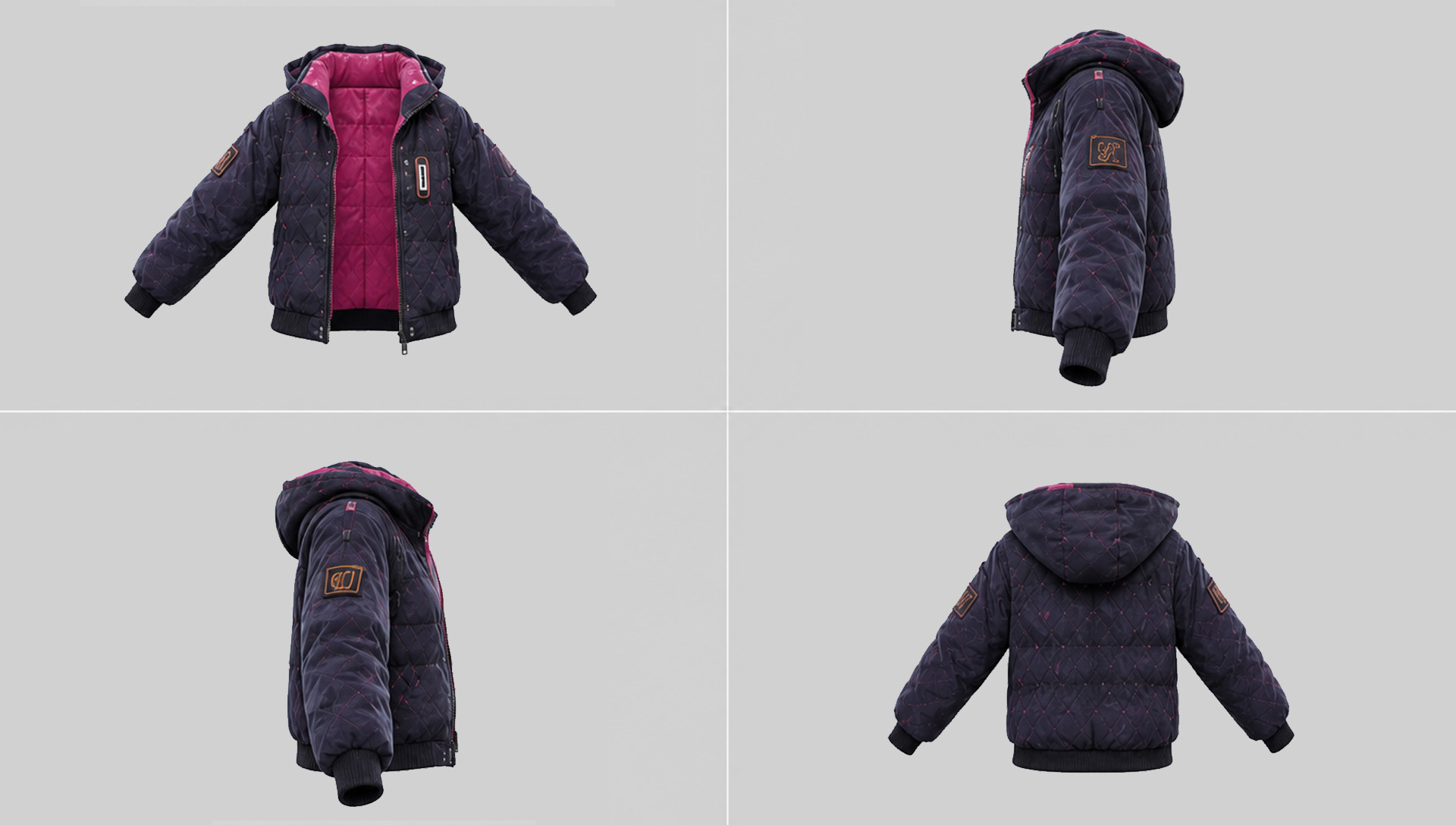
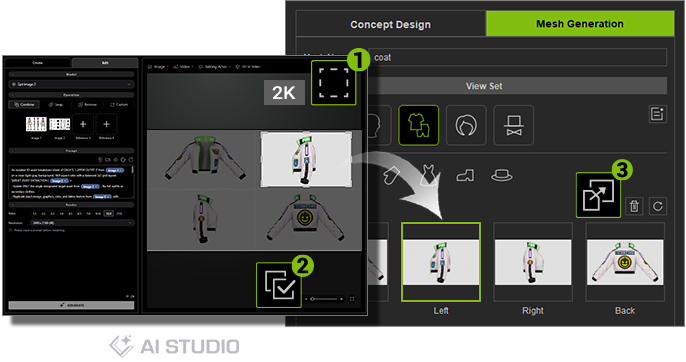
Generate high-resolution, four-view sheets (front, back, and side) for single wearable items. A 4K image layout delivers crisp 2K per-view clarity, defining shape and structure to ensure accurate, ambiguity-free 3D model generation.
Tool 03 High-Res 4-View Item Sheet
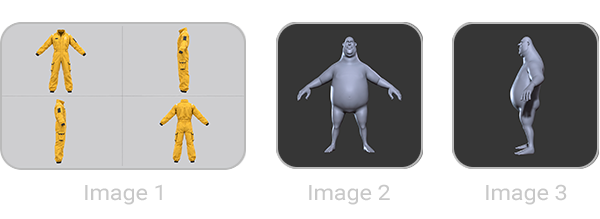
An isolated 3D asset breakdown sheet of ONLY “[ Upper Wear 1 ]” from Image 1 on a clean light-gray background, 16:9 aspect ratio with a balanced 2x2 grid layout.
TARGET ASSET EXTRACTION ( Image 2 ):
- Isolate ONLY the single designated target asset from Image 2 . No full outfits or secondary clothes.
- Replicate exact design, graphics, color, and fabric texture from Image 2 with 100% fidelity.
STRICT ANATOMY, LENGTH & VOLUME ALIGNMENT ( Image 1 ):
- STRICTLY replicate Image 1 's exact low A-pose stance, arm angles, and leg position.
- MATCH EXACT FIT: Garment length, sleeve coverage, chest/waist curves, torso thickness, and 3D depth MUST 100% match Image 1 's body volume and garment proportions.
- Fit over an invisible 3D body mesh that strictly mirrors Image 1 's anatomical form.
LAYOUT & NO-DISTORTION ASPECT RATIO (16:9):
- 2x2 Grid: Top-Left (Front), Top-Right (Left Side), Bottom-Left (Right Side), Bottom-Right (Back).
- Hollow 3D product on invisible form. ZERO human skin, face, or mannequins.
- PRESERVE ASPECT RATIO: Maintain true physical height-to-width garment ratios. Absolutely NO horizontal stretching, squishing, or distortion to fit 16:9. Studio neutral lighting, light-gray background. --ar 16:9
Negative Prompt:
full outfit, secondary garments, unselected clothes, pants, shorts, human skin, face, head, body parts, visible mannequin, vertical straight arms, t-pose, incorrect length, wrong proportions, incorrect body thickness, aspect ratio distortion, stretched horizontally, squished garment, warped clothing, text, watermark, labels, 3/4 view.
Tool 04 Body-Specific Outfit Design Sheet
Generate body-aligned outfit concepts tailored to your character's proportions and pose. Combine existing clothing designs with base character views to create perfect references for 3D modeling and skin-weight transfer.
Tool 04 Body-Specific Outfit Design Sheet
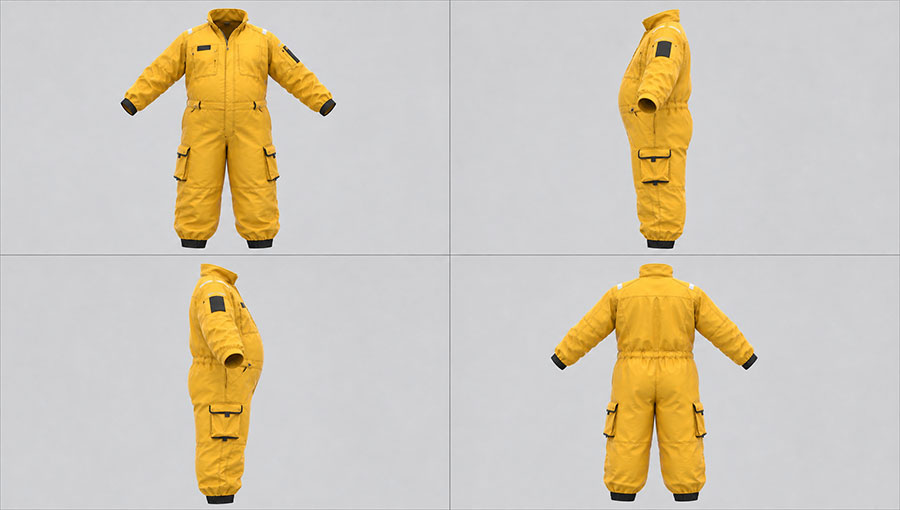
[REFERENCE DIVISION]
Use Image 1 strictly for target asset type, design style, graphics, and materials.
Use “[Image 2 Image 3]” strictly as the baseline for character body shape, body type, pose, volume, waist width, and 3D profile depth.
[CANVAS LAYOUT]
A single 16:9 canvas formatted as a 2x2 GRID displaying FOUR orthographic views of the HOLLOW CLOTHING SHELL ONLY (NO HUMAN/CHARACTER MODEL ALLOWED).
[RIGID HOLLOW SHELL — PHYSICAL MOLD BINDING]
Render ONLY the full-color clothing asset from Image 1 , behaving as a rigid, frozen hollow shell molded directly around the exact physical body volume of the provided character template images:
- STRICT 1:1 GEOMETRIC Silhouette & DEPTH LOCK:
* The garment MUST NOT shrink, slim down, flatten, normalize, or fit to a standard mannequin.
* The front-to-back profile thickness in Cell 2 and Cell 3 MUST 1:1 MATCH the maximum body thickness (including belly bulge, torso depth, and waist width) established in the character template images.
* The outer silhouette width and fabric stretch in Cell 1 and Cell 4 MUST exactly mirror the character's physical dimensions.
- ABSOLUTE NO CHARACTER / NO SKIN:
* Completely erase 100% of the character's body, grey skin, head, face, neck, hands, and feet.
* Render ONLY the hollow 3D clothing shell supported by the invisible frozen body shape.
* All natural openings (collar, cuffs, waistband, leg hems) MUST be open, hollow 3D holes.
- STRICT ASSET TYPE RECOGNITION:
-* Automatically recognize the asset type from Image 1 (Top/Shirt, Pants/Shorts, Full Outfit, or Accessory) and render ONLY that specific item without adding extra clothes or deforming garment style.
- Cell 1 (Top-Left): 0° Pure Front View (1:1 body width match).
- Cell 2 (Top-Right): 90° Pure Left Profile View (Facing LEFT border; 1:1 max profile depth & belly curve match).
- Cell 3 (Bottom-Left): 90° Pure Right Profile View (Facing RIGHT border; 1:1 max profile depth & belly curve match).
- Cell 4 (Bottom-Right): 180° Pure Back View (1:1 body width match).
[STYLE & RENDERING]
Clean light gray background, neutral studio lighting, pure orthographic projection render. Thin dividers. No text, labels, or watermarks. Aspect ratio 16:9.
Negative Prompt:
shrunken profile depth, thinned torso, narrowed body width, flattened stomach, deflated clothing, normalized garment size, default mannequin sizing, flat garment, standard apparel fit, human skin, character body, human model, head, face, neck, arms, legs, hands, feet, grey clay skin, visible body parts, altered pose, distorted clothes, added extra clothing, 3/4 angle, perspective rotation.
Tool 05 High-Res 4-View Body Sheet
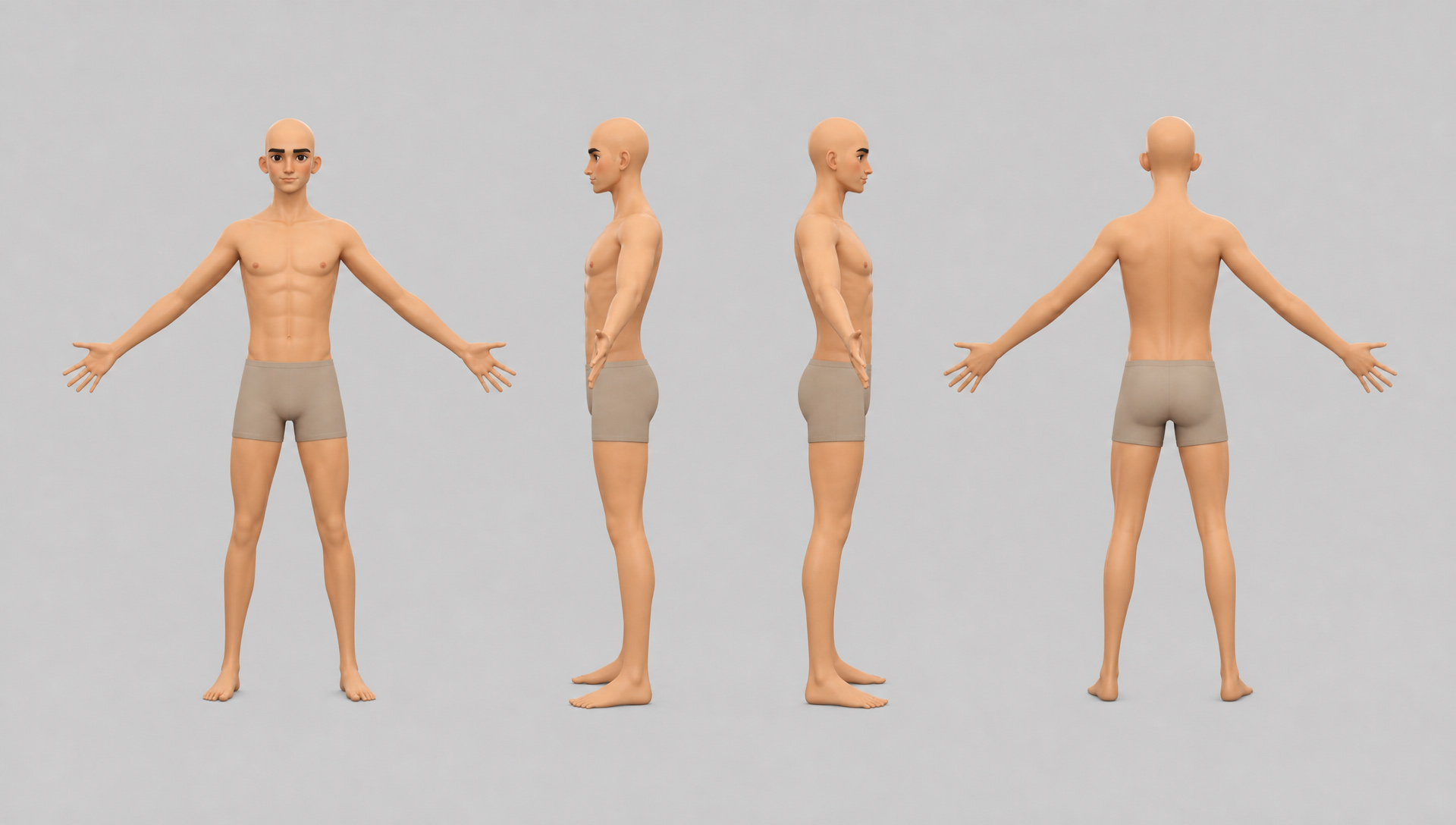
Transform character references into a high-resolution four-view body sheet in A-pose, with clearly defined proportions and anatomy for CC base character creation, body wrapping, and character dressing.
Tool 05 High-Res 4-View Body Sheet
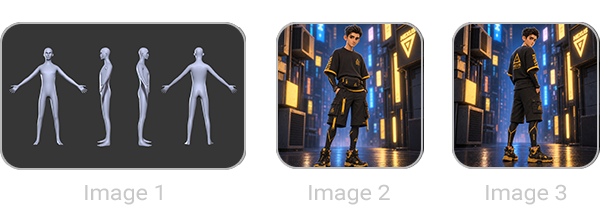
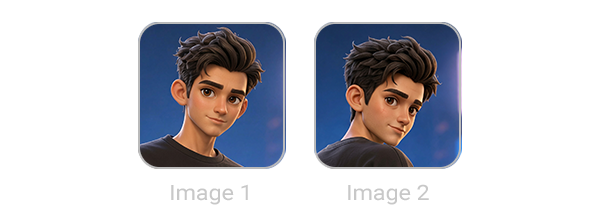
Use Image 1 as the exact base outfit color, pose, hairless base mesh, and layout reference. Use “[Image 2 Image 3]” as the target character reference.
[GENDER SPECIFICATION - CHANGE THIS LINE ONLY]
TARGET GENDER: “[MALE]”
[TARGET CHARACTER - STRICT MATCH FROM IMAGE 2]
Generate the EXACT character from Image 2 matching the specified TARGET GENDER, strictly preserving:
- Face & Likeness: 100% exact facial features, face shape, eye shape, eyebrows, nose, mouth, makeup, and expression directly copied from Image 2.
- Skin Texture & Shading: Match Image 2's exact skin rendering quality, realistic skin texture, shading, highlights, and skin tone.
- Body & Physique: 100% exact body proportions, height, muscle build, body shape, shoulder width, waistline, and leg shape from Image 2. Do NOT alter the physique.
[OUTFIT & STRIPPED BASE MESH]
- Completely remove ALL original hair, outfit, jackets, pants, sneakers, bags, hats, and accessories from Image 2.
- Head MUST be completely bald/shaved, matching Image 1.
- DYNAMIC UPPER BODY:
* If TARGET GENDER is FEMALE -> Wear an ultra-tight, form-fitting cropped sports bra ending just below the bust (color #A8927C, identical to Image 1).
* If TARGET GENDER is MALE -> NO TOP / BARE UPPER TORSO (completely uncovered chest, shoulders, abs, and waistline, wearing zero shirts or vests).
- LOWER BODY: Wear ONLY ultra-tight form-fitting beige compression shorts matching the exact color (#A8927C) and material of Image 1.
[LAYOUT, POSE & CAMERA - FROM IMAGE 1]
- Composition: Replicate the exact 1x4 horizontal turnaround sheet layout from Image 1 displaying 4 full-body views in a single row.
- Pose: Strictly match the A-pose from Image 1 across all 4 views (arms extended outward at a low angle, palms facing forward).
- Views Order: Front, Left Side (90° profile facing right), Right Side (90° profile facing left), and Back view.
- Camera & Framing: Match the orthographic camera angles, scale, studio lighting, and solid light-gray (#d9d7db) background. No text or labels.
Tool 06 High-Res 4-View Head Sheet
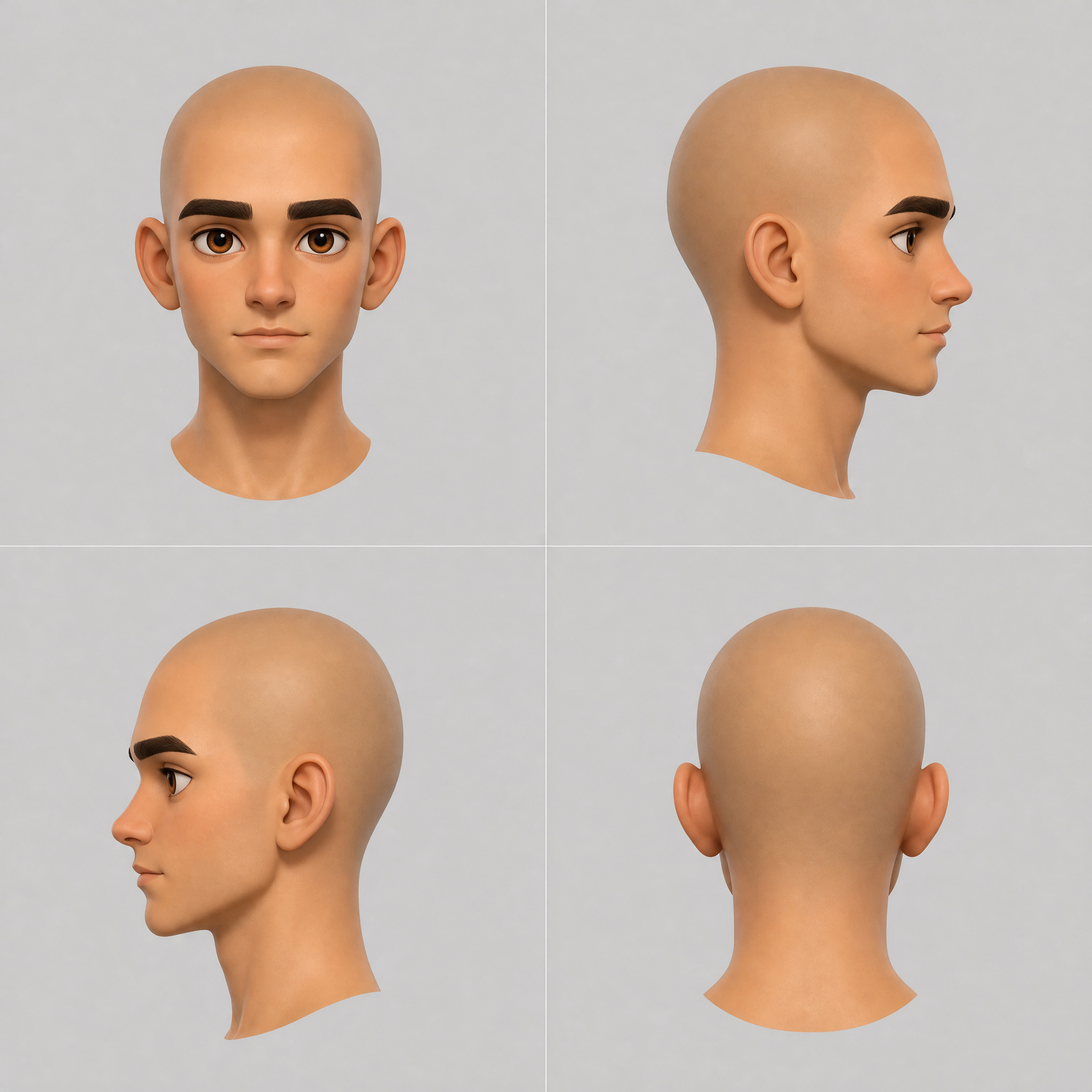
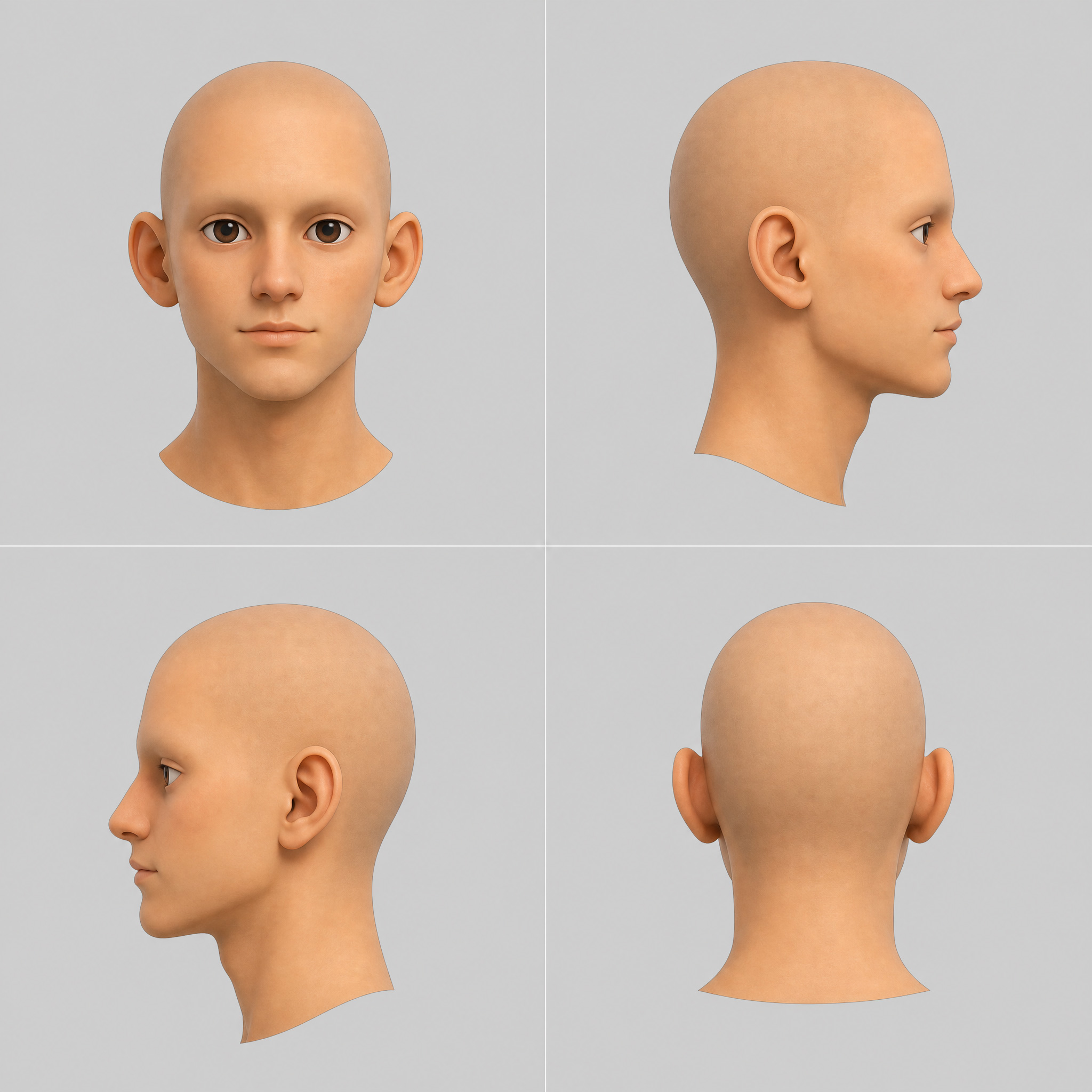
Transform character references into a high-resolution four-view head sheet for AI 3D generation and Headshot wrapping. Keep or remove eyebrows and eyelashes for cleaner topology, and adjust makeup for desired facial textures.
Tool 06 High-Res 4-View Head Sheet
[Reference Input Division]
- Art Style & Material: Use Image 1 strictly as the primary reference for art style, rendering medium, skin shader, and material texture.
- Facial Geometry & Mesh: Cross-reference “[Image 1 Image 2]” jointly for facial geometry, likeness, and 3D mesh.
- Crop Region & Scope: Crop scope is strictly head and neck only, 100% bald and shaved.
[User Configuration - Master Override]
- Target Eyebrows and Lashes: “[PRESERVE]”
- Target Makeup: “[PRESERVE]”
[1. Absolute 2x2 Grid Orientation & Direction Lock]
Generate a clean 2x2 grid layout Turnaround Sheet on a 1:1 square canvas. Strictly enforce the following four directions with zero deviation:
1. Top-Left Cell (Front View): 0° Frontal view, head facing directly forward into the camera lens. Both ears visible equally.
2. Top-Right Cell (Left Profile View): Exact 90° pure profile view facing right. The head must point strictly towards the right border of the cell.
3. Bottom-Left Cell (Right Profile View): Exact 90° pure profile view facing left. The head must point strictly towards the left border of the cell.
4. Bottom-Right Cell (Back View): 180° Back view showing the rear of the bald head and neck, facing directly away from the camera.
[2. Universal Style & Flat Studio Lighting Lock]
- Direct Medium & Style Clone: Automatically inherit and clone the exact rendering medium and art style from the primary style reference. If the reference is a 3D CG or game render, output a matching 3D digital render; if the reference is a real photorealistic human, output matching photorealistic human skin.
- 3D Texture Flat Lighting: Standard turnaround studio lighting. Mandatory flat, even, uniform lighting across all 4 views with no strong direction, no color cast, no neon highlights, and no harsh directional shadows. Perfect flat neutral lighting for texture baking.
[3. Facial Geometry & Likeness Lock - Base Mesh]
Mandatory 1:1 exact replication of the underlying base mesh and facial geometry derived from the reference images:
- Eye Geometry & Iris: Mandatory 1:1 replication of exact eye shape, eyelid fold structure, iris pattern, and eye color from the reference images.
- Face Shape: Mandatory 1:1 replication of overall head shape, jawline angle, cheekbone structure, and chin contour.
- Nose & Lips: Exact replication of nose bridge height, nose tip shape, lip fullness, and mouth corner structure.
- Ear Shape: Mandatory 1:1 exact replication of ear placement, size, and cartilage contour.
[4. Strict Head Scale & Camera Framing Match]
- Head Size & Occupancy: The vertical height of the head (from top of skull to chin) must occupy strictly 60% to 65% of each individual cell's vertical frame.
- Spacious Padding: Leave generous, empty light-gray background space above the top of the head (at least 20% margin) and below the neck to prevent the head from appearing oversized or touching frame borders.
- Uniform Head Scale: Every head across all 4 cells must be rendered at the exact same scale, height, alignment, and orthographic camera distance.
[5. Asset Scope & Expression]
- Crop Region: Strictly crop output to show only the head and neck turnaround. Do not show shoulders, chest, or torso.
- Hair & Baldness: Completely remove all scalp hair, beanies, or hats. Make the head 100% bald and shaved.
- Facial Expression: Completely neutral, blank, emotionless, resting face across all 4 views. Closed mouth, relaxed lips, neutral eyes.
[6. Overlay Layer Toggle Execution]
- Eyebrows & Eyelashes Logic:
* If Target Eyebrows and Lashes is PRESERVE -> Retain and draw both exact natural eyebrows and eyelashes from the reference images.
* If Target Eyebrows and Lashes is REMOVE -> Force-erase all eyebrows and eyelashes completely. Render smooth bare skin over the brow bone and eyelids with zero hair, zero painted strokes, and no shadow overlay.
- Makeup Logic (Cosmetics Only - Excluding Eyebrows & Lashes):
* Makeup strictly refers to eyeshadow, facial blush, and lipstick color.
* If Target Makeup is PRESERVE -> Keep cosmetic eyeshadow, blush, and lipstick from reference images.
* If Target Makeup is REMOVE -> Strip all eyeshadow, blush, and lipstick color overlay completely. Reveal natural bare skin tones while 100% preserving the exact rendering medium, base skin shader, and eye geometry from Sections 2 & 3.
[7. Background & Camera]
Uniform solid light-gray background (#D3D3D3), pure orthographic camera view (no perspective distortion), clean thin grid dividers. No text, floating UI, or extra panels.
[8. Negative Prompt & Strict Exclusions]
Do not draw any eyebrows, do not draw any eyelashes, no painted eyebrows, no brow shadow, no lash line. Do not alter, drift, or modify the character's facial geometry, head shape, eye angle, or likeness. Do not add: shoulders, chest, torso, clothes, scalp hair, wigs, hats, colored ambient light, neon rim light, harsh shadows, distorted ears, asymmetric eyes, extra text, watermark, signature, borders, or perspective camera distortion.
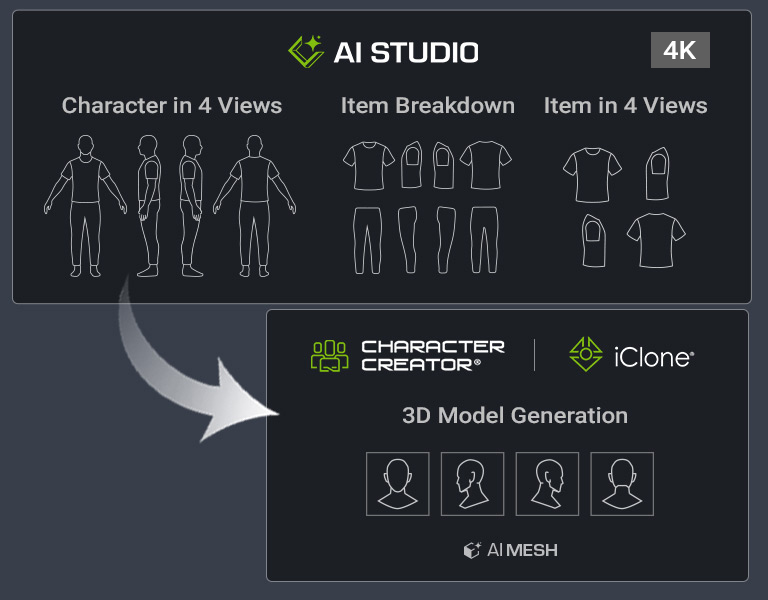
Bring your multi-view concept images into the Mesh Generation panel by copying and pasting them into the corresponding view inputs. Full-resolution copying preserves up to 2K per view, providing clear front, side, and back references for more accurate AI 3D model generation.